Mulligan (Pyq AI) — AI Automation Platform for Insurance
Problem
Insurance brokers spend 15+ hours weekly on manual data entry, policy comparison, and commission reconciliation—work that doesn't scale.
Solution
Built AI automation platform with 5 core products (quoting, submissions, proposals, policy comparison, commissions) and transformed go-to-market from enterprise to self-serve PLG with usage-based billing.
Key Impact
- •~90% quoting automation (vs manual processes)
- •15+ hours saved weekly per brokerage
- •Multi-agent API orchestration with error recovery
- •Self-serve onboarding: free tier → paid in <10 min
- •Credit-based pricing: $0/mo (free) → $999/mo (team)
Context
At Pyq AI, we built Mulligan — an AI automation platform for insurance brokerages. Insurance brokers were spending 15+ hours weekly on manual data entry, policy comparisons, and commission reconciliation. This work didn't scale: to 10x revenue, they'd need to 10x headcount.
We built 5 core products to automate these workflows: Quoting, Submissions, Proposals, Policy Comparison, and Commissions. As the AI Product Engineer at this seed-stage startup, I wore every hat — building product features and transforming our go-to-market from enterprise sales to self-serve Product-Led Growth.
Jump to Section
1. PLG Infrastructure: Stripe, Metronome, and Slack
Challenge: Insurance brokers face extreme seasonality—processing 50 policies in January (renewal season) and only 5 in July. Flat subscription pricing ($99/mo unlimited) punishes this pattern, charging the same whether they use the product heavily or barely at all. We needed self-serve pricing aligned with customer value that supported seasonal usage without requiring sales calls or contract negotiations for a seed-stage startup.
What I Built: Built complete self-serve billing infrastructure combining Stripe for payments and Metronome for usage tracking.
- Credit-based pricing: Customers buy credits upfront (Free: 10, Plus: 30, Pro: 250, Team: 1250), consume them per action, with 1-year rollover
- Stripe integration: Instant upgrade flow (<2 min from free → paid), no credit card required for free tier
- Metronome tracking: Every user action sends billing events to track usage.
- Organization-scoped billing: Every event tagged with org ID for per-organization usage limits and invoicing
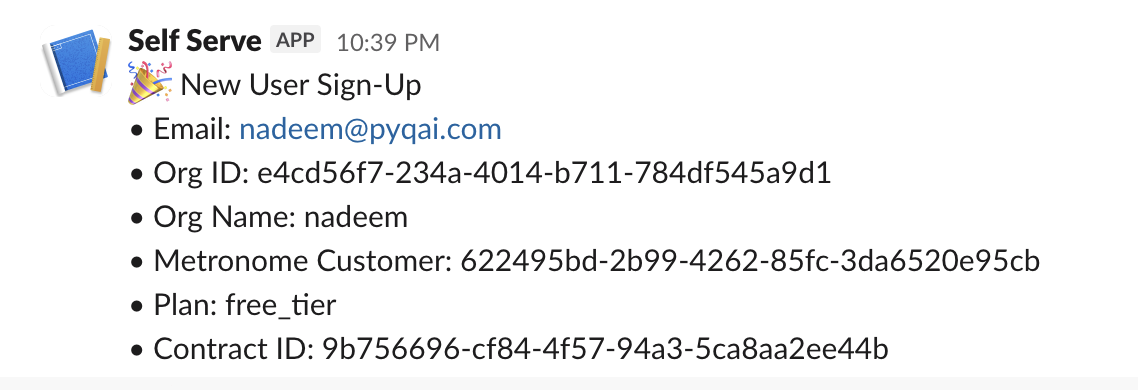
Slack notifications provide real-time visibility into user signups, upgrades, and feature usage
Key Technical Decisions:
- Metronome over building in-house: Stripe handles payments but can't track complex usage patterns. Metronome specializes in usage-based billing with meters and tiered pricing—gave us production-ready infrastructure immediately instead of spending months building it ourselves.
- Credit consumption on end states: Built into our backend—credits are only consumed when a process successfully reaches an end state (success, fail, or denied). This ensures users only pay for completed operations, not abandoned or interrupted ones.
- Two-stage billing: Users perform actions (real-time event tracking) → Metronome accumulates usage → Monthly invoices calculated based on total consumption. Separates event collection from billing for reliability.
Key Product Decisions:
- Credits over subscriptions: Aligns pricing with value—busy months cost more, slow months cost less. Credits roll over for 1 year, so customers don't lose unused credits. Supports seasonal insurance workflows.
- No card for free tier: Users can process features worth 10 credits freely without payment. See value before paying. Removes signup friction.
- Instant self-serve upgrade: Free → paid in <2 minutes via Stripe Checkout. No sales calls. Any friction in upgrade flow kills PLG conversion.
- Tiered volume discounts: Subscription credits are cheaper than pay-as-you-go credits, but also stickier—customers commit to monthly payments. Incentivizes users to upgrade to subscription plans as usage grows. High-volume customers automatically pay more, so revenue scales with customer success.
Impact:
- Self-serve signup and upgrade: no sales calls or contracts required
- Usage-based revenue scales with customer success: customers pay proportional to value, supporting seasonal workflows
- Free → paid conversion: users see value before paying
- Metronome enables the team to track usage and monitor platform activity
2. Setting Up Live Demos
Challenge: Converting website visitors to sign-ups is hard when the product is complex. Insurance automation isn't something people can understand from screenshots or marketing copy—they need to see it work. However, if live demos take too long to load, this will cause users to leave before seeing results. We needed interactive demos that proved functionality while loading fast enough to keep users engaged.
What I Built:
- Interactive live demo system for Policies and Commissions products embedded on landing page
- Isolated demo instances running on pre-loaded sample insurance documents
- Parallelized Google Cloud Functions reducing latency from 150s → 15s (10x improvement)
- Real-time progress indicators showing processing steps
- Demo-specific API endpoints processing sample data instantly
- Next.js frontend with WebSocket connections for live status updates
- Zero friction access (no login required to try demos)
Live demo of the Policies product — side-by-side policy comparison with automated analysis
Live demo of the Commissions product — automated commission reconciliation from carrier statements
Key Technical Decisions:
- Parallelized cloud functions: Initial demos took 150 seconds (users would leave). Parallelized document processing across multiple cloud functions cut latency to 15 seconds. Critical for user engagement.
- Pre-loaded sample data: Visitors might not have insurance documents readily available to test the product. We provide sample documents so users can see the product work immediately—removing the barrier of "I don't have a document to try" and pushing them further down the conversion funnel.
- WebSocket status updates: Real-time progress indicators show each processing step. Users see the system working (parsing PDF, extracting data, comparing policies) rather than staring at a loading spinner.
Key Product Decisions:
- No signup required: Demos work immediately without account creation. Reduces friction—users see value before committing. Classic PLG strategy.
- Real processing over fake mockups: Run actual processing on sample documents instead of showing static screenshots. Builds trust—users see genuine functionality, not fake demos.
- 15-second performance threshold: At 150s, users left. At 15s, they stayed and completed the demo. Performance directly impacted conversion from visitor → signup.
Impact:
- Website visitors try Policies and Commissions features instantly without signup
- Users see real output before creating an account
- 10x performance improvement (150s → 15s) kept users engaged through full demo
- Supported self-serve PLG strategy by showing value upfront
3. Building the Quoting System
Challenge: Insurance carriers don't offer APIs—they have web portals designed for humans to manually click through forms. Getting quotes from multiple carriers required brokers to spend ~1 hour per customer manually visiting each carrier website, filling forms, and copying results. This manual process was slow, expensive, and didn't scale.
What I Built: Built an automated quoting system that processes customer information, interacts with multiple carrier portals programmatically, and handles the complexity of different carrier formats and requirements. The system includes monitoring, error handling, and parallel processing capabilities to ensure reliability and speed.
Automated quoting system processing multiple carriers in parallel—form filling, submission, and data extraction without human intervention
Key Technical Decisions:
- Docker containerization: Browser automation scripts are extremely sensitive to environment differences (browser versions, screen sizes, font rendering). Docker ensures identical execution every time.
- Parallel processing: Running multiple carriers simultaneously instead of sequentially dramatically reduced total quote time from cumulative processing to the time of the slowest single carrier.
Key Product Decisions:
- Graceful degradation: If automation fails, system falls back to manual quote request rather than blocking the user. Automation improves UX but doesn't create new failure modes.
- Carrier prioritization: Focus automation on high-volume carriers first. 80/20 rule—automate the 5 carriers that represent 80% of quote volume.
- Slack monitoring: Real-time alerts when carrier integrations break (they change UIs frequently). As a seed-stage startup, we needed immediate visibility.
Impact:
- Quote time: ~1 hour → <10 minutes (per customer)
- Automated ~90% of quoting workflows
- Parallel processing handles multiple carriers simultaneously
- Brokers can quote more customers per day, increasing revenue capacity
4. Advanced Policy Comparison
Challenge: Different insurance carriers use wildly inconsistent terminology for the same coverage concepts. One policy might call it "Comprehensive and Collision Limit" while another says "Automotive coverage - comprehensive and collision." Brokers waste hours manually matching up equivalent items across policies to do apples-to-apples comparison. The insurance industry has no standardized terminology.
What I Built:
- Semantic matching system that intelligently groups and standardizes inconsistent insurance terminology across carriers
- Ability to seamlessly switch between original carrier data and standardized unified views
- Original names dropdown showing all unified terminology for full transparency
- Comprehensive processing across multiple policy sections (coverages, limits, deductibles, endorsements, etc.)
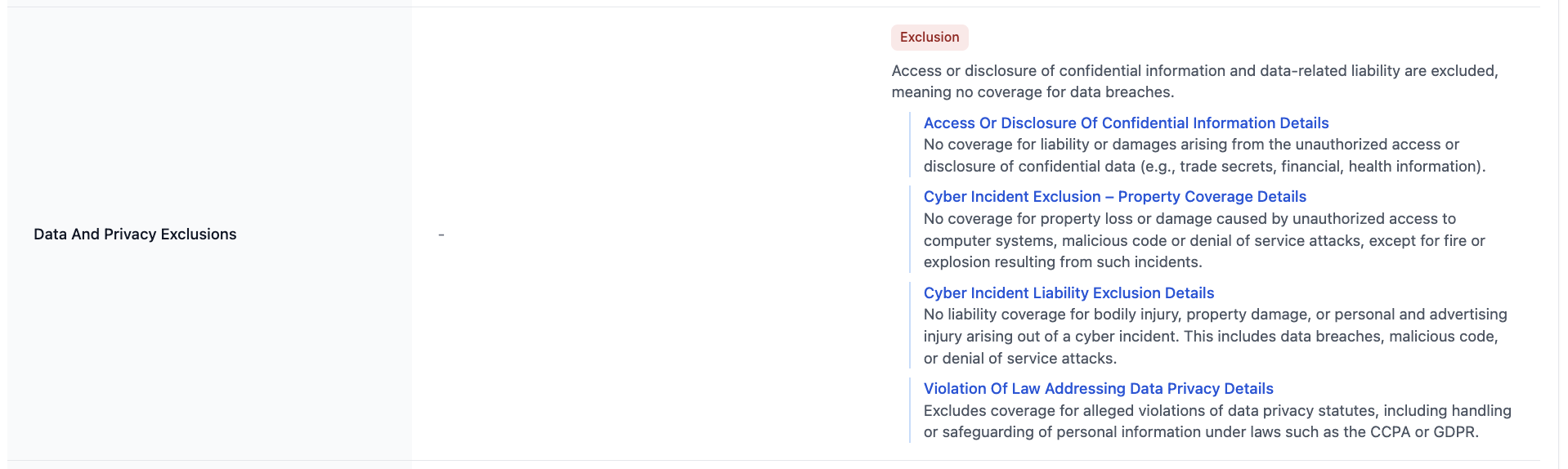
Within-policy consolidation: Left shows item names, right shows Policy1 and Policy2 columns—related items merged within each policy to reduce clutter
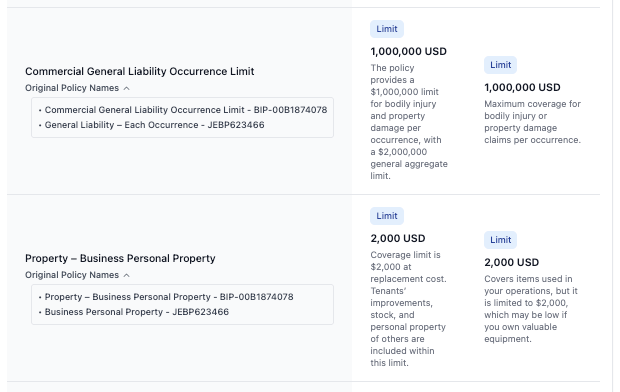
Cross-policy standardization: Policy1 and Policy2 had different names for the same coverage—now unified under one standardized name for apples-to-apples comparison
Key Technical Decisions:
- Domain-aware matching: Built semantic matching that understands insurance context—recognizing that identical terms can mean different things across policy types (e.g., "collision" in auto vs property insurance means different coverage).
- Transparency by default: Preserve all original carrier terminology in the background while displaying unified names. Brokers can always drill down to see exactly what each carrier called a specific item.
Key Product Decisions:
- View switching: Let brokers switch between different data views. Builds trust—they can verify the system's matching decisions.
- Full transparency: When items are unified, brokers can always see the original carrier terminology. Transparency prevents "black box" concerns.
- Broker verification: Show unified view as default after processing, but always allow returning to original data. The system augments broker expertise, doesn't replace it.
Impact:
- Policy comparison: hours of manual matching → seconds of processing
- Apples-to-apples comparison across carriers with different terminology
- Semantic understanding handles inconsistent naming (e.g., "CGL" = "General Liability" = "Commercial General Liability")
- Brokers can confidently identify coverage gaps and recommend best policies
5. Third-Party API Integrations (Coverforce)
Challenge: Insurance quoting workflows involve multiple dependent API calls with strict data schemas, partial success states, and high failure rates due to malformed inputs or missing context. Manually handling these workflows was slow (~1 hour per quote), error-prone, and impossible to scale. We needed a system that could dynamically reason about which APIs to call and in what order, validate and transform data between steps, recover gracefully from errors, persist intermediate and final states, and present a clean, deterministic UX to the end user.
What I Built: Led the design and implementation of a production-grade, multi-agent third-party API integration to automate complex insurance quoting workflows. Built a reliable, agentic system capable of orchestrating multiple APIs, validating inputs, handling partial failures, persisting state, and returning user-friendly outputs—all in real time.
The system architecture consisted of:
- Frontend (Next.js): Initiates quote requests and renders progress + results
- Backend API (FastAPI): Control plane for workflow execution
- Agent Layer: Multiple specialized agents for input validation, API selection/sequencing, schema transformation, and error interpretation
- Database (PostgreSQL): Stores workflow state, tracks partial progress, persists final quote results
- Error Workflow Engine: Dedicated failure paths with structured error objects and user-safe messaging
Agentic Workflow Design: Rather than treating the integration as a single request/response cycle, I implemented it as a stepwise agentic workflow with specialized agents:
- Pre-flight Agent: Validates user input, normalizes fields to match API schemas, prevents downstream failures early
- Planning Agent: Determines which APIs are required for the given quote, establishes call ordering and dependencies
- Execution Agents: Execute individual API calls, transform responses into canonical internal formats, handle retries and backoff
- Validation Agent: Ensures responses meet business and schema constraints, detects partial success or degraded responses
- Finalization Agent: Aggregates results, computes final outputs, prepares user-safe response payloads
Each agent was prompted and constrained to perform one narrow responsibility, improving reliability and debuggability.

n8n workflow integrating frontend with backend to third-party carrier APIs—performing validation, writing to database, error handling, and agentically filling API requests to retrieve quotes and display results back to the user
Key Technical Decisions:
- Multi-agent orchestration: Separated concerns across specialized agents rather than monolithic processing. Each agent handles one specific responsibility (validation, planning, execution, aggregation), making the system more maintainable and debuggable.
- Error-first architecture: Built parallel error workflow that could be triggered at any step—structured error classification (validation vs upstream vs system), immediate persistence of failure state to database, graceful degradation where possible, user-readable error messages without exposing internal details, safe retries without duplicating side effects.
- Stateful workflow design: System could write intermediate results to database, update workflow state multiple times, recover from mid-execution failures, and guarantee consistency across retries. Required careful transaction design and explicit control over when and how writes occurred.
- Schema transformation layer: Built explicit transformation logic between external API schemas and internal canonical format. Prevented schema mismatches from propagating through the system.
Key Product Decisions:
- Deterministic UX: Designed frontend/backend contract to ensure deterministic request schemas, clear loading and progress states, idempotent backend endpoints, real-time status updates, and clean final result rendering. Frontend could reliably trigger workflows, poll or await completion, and display success or failure without ambiguity.
- Graceful degradation: System handles partial failures intelligently—if 2 out of 3 carrier APIs succeed, return available quotes instead of failing entirely. Users get partial value even when some integrations fail.
- Observable workflows: Every step logged and tracked in database. Enabled debugging production issues by replaying exact workflow execution sequences.
Impact:
- Reduced quote processing time from ~1 hour to under 10 minutes
- Enabled fully automated quoting at scale
- Significantly reduced manual errors in quote processing
- Became a reusable pattern for future third-party integrations
- Strengthened ability to design resilient integration systems, read and reason through poorly documented APIs, build agentic workflows with operational guarantees, and think end-to-end about product, UX, and systems reliability
6. Templates and Proposals
Challenge: Insurance brokers spend hours manually creating branded proposals—copying policy data into Word docs, adding logos, formatting tables. Every agency has unique branding requirements. We needed proposal automation that preserved each agency's exact visual identity while filling in policy-specific data.
What I Built:
- Automated PDF → HTML template conversion pipeline
- Organization-scoped template library for multi-agency support
- Automated proposal generator with editable interface for manual adjustments
- Multi-mode PDF export (single-page, multi-page, smart pagination)
How It Works: Agencies upload their branded proposal PDF once. We convert it to an HTML template with placeholders. Then generate unlimited proposals for any policy—preserving the agency's logo, colors, and layout while filling in policy-specific data.
Full Pyq-branded proposal template showing preserved agency branding (logo, colors, layout structure)
Key Technical Decisions:
- Automated PDF conversion: Built conversion pipeline that preserves visual fidelity (logos, colors, fonts, layouts) while extracting semantic structure for data injection. Delivers higher accuracy than template-based approaches.
- Presigned S3 URLs for images: Template images stored in S3, served via expiring URLs. Avoided CORS issues during PDF export while maintaining security.
- Smart pagination: Multi-page proposals automatically break at logical boundaries to prevent awkward content splits across pages.
Key Product Decisions:
- Brand consistency over flexibility: Let agencies upload their own PDF templates. System preserved exact branding rather than forcing a generic template. Higher adoption.
- Edit before export: Generated proposals are editable (WYSIWYG). Automated filling handles ~90% correctly, brokers fix the rest. Builds trust while saving time.
Impact:
- Proposal generation: hours → minutes
- Perfect brand preservation (logos, colors, layouts)
- Template reuse across all proposals
- Professional client-ready PDFs with one click
7. ACORD Form Automation
Challenge: ACORD forms (125, 126, 140) are standardized insurance PDFs with 50+ fields that brokers manually fill for every carrier submission. This tedious data entry wastes hours per submission and creates bottlenecks in the quoting workflow. We needed automation that could both extract data from filled forms AND populate blank forms from customer information.
What I Built: Built an automated ACORD form system that handles bi-directional workflows: extracting structured data from broker-uploaded forms and auto-filling blank ACORD PDFs from customer data. The system includes a review interface in the Submissions module where brokers can verify and adjust auto-filled forms before final submission.
Key Product Decisions:
- Broker review before submission: Auto-filled 80-90% of fields accurately but let brokers verify and correct before sending to carriers. This builds trust while dramatically reducing manual work.
- Bi-directional workflow: Parse uploaded PDFs OR fill blank forms. Covers both inbound flows (extracting client data from existing forms) and outbound flows (generating new carrier submission forms).
- Integration with submission pipeline: ACORD automation sits within the broader Submissions product, enabling seamless handoffs to carrier portals.
Impact:
- 80-90% auto-fill accuracy across ACORD 125, 126, and 140 forms
- Hours of manual form entry → minutes of verification and adjustment
- One-click conversion: uploaded customer documents → carrier-ready ACORD PDFs
- Enabled self-serve, automated carrier submission workflow
8. Landing Page
Designed and built the complete GTM funnel at usemulligan.com using Next.js. The landing page serves as our entire sales team—replacing demo calls with self-serve signup.
Key GTM Strategy:
- Embedded live demos: Visitors see real AI processing (Policies + Commissions) without signup
- Transparent pricing: Credit calculator shows exact costs upfront—no hidden fees
- Zero friction signup: 10 free credits, no credit card required
- <5 minute onboarding: Land → Try demo → Sign up → Use product
- Value-first approach: Users see functionality before paying
Built with Next.js for fast load times (<2s), SEO optimization, and seamless integration with Stripe checkout. The page showcases all products, pricing tiers, and instant signup—designed to convert visitors without human intervention.
9. Documentation
Built comprehensive product documentation for Mulligan's self-serve PLG model using Mintlify. The docs enable users to onboard, troubleshoot, and integrate without human support.
Live Docs: docs.usemulligan.com
The documentation includes getting started guides, product-specific tutorials, API references, and troubleshooting resources—guiding users on how to use the platform.
Summary
Stack: Next.js, FastAPI, Stripe, Metronome, Docker, AWS, Google Cloud, S3
Timeline: June 2025 - Present
Company: Pyq AI (YC W23) — seed-stage startup
Role: AI Product Engineer
Live Product: usemulligan.com